Assist Mi Legal

Email to Work

Ava helps turn messy legal communication into draft matters, tasks, client requests, deadlines, notes, and responses for lawyer review.

Assist Mi is not just a chatbot. It is a review-first workflow layer for the work already arriving in your inbox.

Communication Understanding

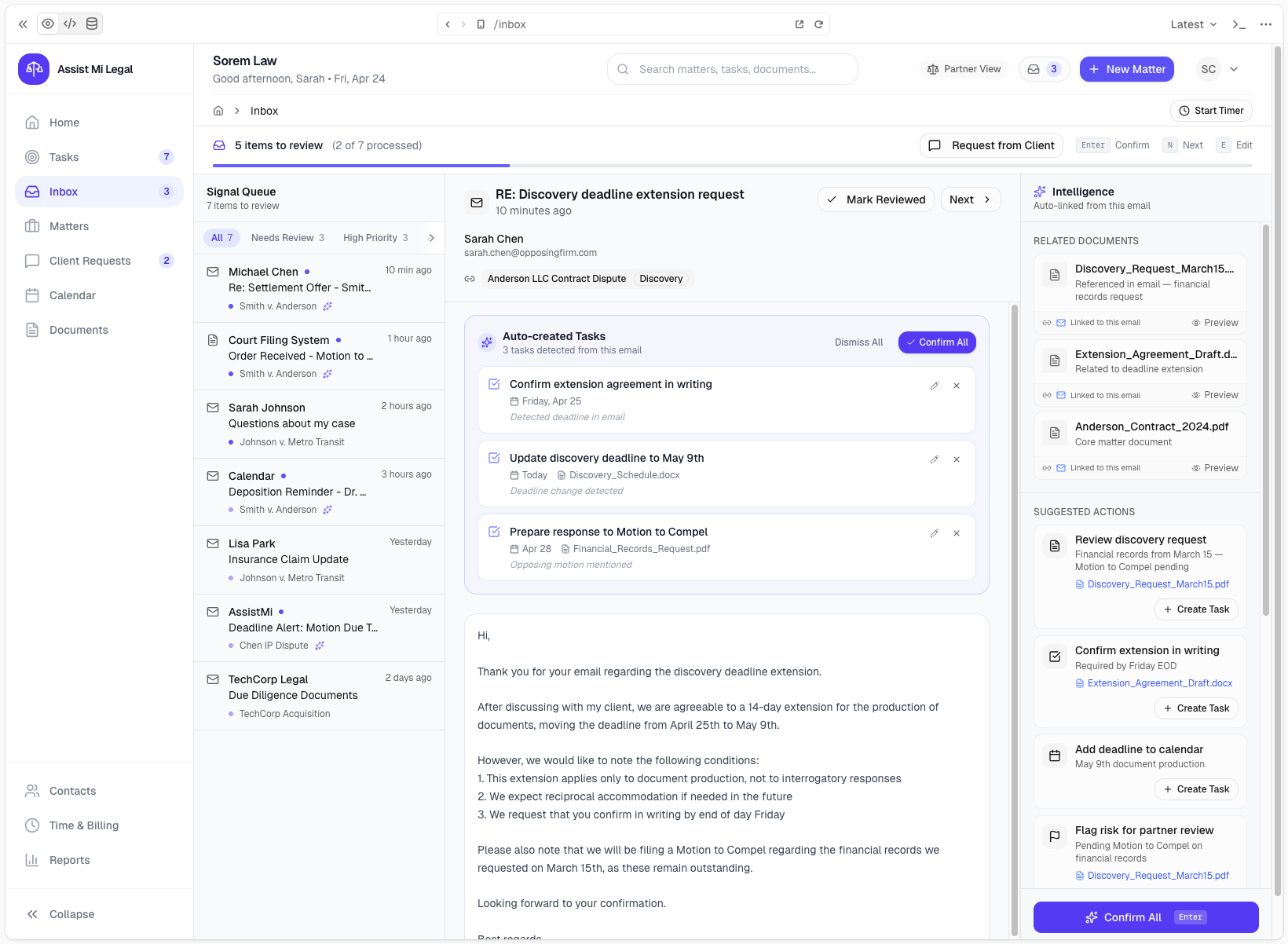
Email arrives. Reviewable work comes out.

Ava looks for intent, matter context, parties, dates, requests, and uncertainty. Then she prepares drafts the lawyer can approve, edit, or ignore.

Email arrives

A client, colleague, or forwarded message enters the workflow.

Ava understands intent

Ava looks for matter context, client identity, requests, dates, and ambiguity.

Draft work is prepared

Matters, tasks, notes, requests, and responses stay draft-first.

Lawyer reviews

Nothing is sent or committed without attorney approval.

Assist Mi Legal inbox showing matter-aware communication review

Real Legal Workflows

Examples that look like an actual legal inbox

The point is not to summarize simple email. It is to convert real-world legal communication into organized draft work, while preserving attorney control.

Multi-intent matter creation email

Original email

Please create a new matter for Alex Morgan regarding the grocery store slip-and-fall. His email is [email protected]. Also create a task for me to call him tomorrow, ask him for photos and medical records, and note that he has not spoken to the insurer.

What Ava understood

  • New potential matter
  • Client/contact details
  • Follow-up task
  • Client document request
  • Matter note

Drafts created

  • Matter Draft
  • Client Draft
  • Contact Draft
  • Task Draft
  • Client Request Draft
  • Matter Note Draft
Review the draft matter workspace once, edit what needs context, and approve only the records that should move forward.

Opposing counsel deadline

Original email

Opposing counsel says our response is due next Friday. Please make sure this does not fall through the cracks.

What Ava understood

  • Potential deadline
  • Matter update needed
  • Review notification

Drafts created

  • Deadline Task Draft
  • Matter Update Draft
  • Review Notification
Ava surfaces the date as reviewable work so the lawyer can confirm the actual deadline before it becomes operational.

Client request extraction

Original email

Can you ask Dana for the signed amendment and let the client know we are still waiting on the final exhibit list?

What Ava understood

  • Request to contact Dana
  • Client communication needed
  • Possible contact ambiguity

Drafts created

  • Task Draft
  • Client Update Draft
  • Clarification Prompt
If multiple Danas match, Ava asks before creating work against the wrong contact.

Delegated correspondence review

Original email

Review the attached correspondence and tell me what needs attention first. I saw a settlement date, missing payment language, and an unsigned agreement.

What Ava understood

  • Priority review request
  • Settlement timing risk
  • Missing payment follow-up
  • Unsigned agreement issue

Drafts created

  • Priority Summary Draft
  • Task Drafts
  • Matter Note Draft
Ava can rank what appears urgent, but the lawyer decides what is legally important and what gets assigned.

Draft Matter Workspace

Review once. Approve what should move forward.

A messy email can become a structured draft workspace. The lawyer can approve the matter, selected child records, or nothing at all.

Slip-and-fall intake draft

Prepared from inbound email

1
Matter Draft
Review
2
Client Draft
Review
3
Contact Draft
Review
4
Task Draft
Review
5
Client Request Draft
Review
6
Email Draft
Review
7
Matter Note Draft
Review

Edition Positioning

Start by forwarding work. Grow into monitored attention.

Standard and Professional tell a simple progression story without changing the review-first principle.

Standard

Forward work to Ava.

Send or forward important communication to Ava when you want help turning it into organized, reviewable legal work.

Professional

Ava watches for work that needs attention.

With Professional connected systems and real-time mailbox monitoring, Ava can help notice matter-related communication that may need review even before it is forwarded.

Trust Model

No blind automation

Ava prepares and organizes. Lawyers approve, edit, redirect, or reject before work is committed or sent.

Draft-first automation
Human review before commit
Audit trail and provenance
Matter, client, and deadline awareness
No blind client-facing actions
Ambiguity handling before risky updates

Ambiguity is a feature, not a failure.

If Ava cannot confidently identify the matter, client, contact, or date, she asks for clarification or creates reviewable work instead of guessing.

Built for legal communication, not generic chat.

Ava helps transform inbound communication into matter-aware, client-aware, deadline-aware draft work that remains reviewable from start to finish.

See how Ava turns communication into work.

Start with Standard forwarding, then move into Professional connected systems and real-time mailbox monitoring when your firm is ready.